The game root folder
What each folder in the root directory holds — your map when installing mods and when something goes wrong.
The root folder is Assetto Corsa’s main install directory. It holds the core game files, and most mods are installed into it. Knowing your way around it matters for both installing mods and troubleshooting them.
Finding it
In Steam, open your library and find Assetto Corsa. Click the settings cog and choose Manage > Browse local files.
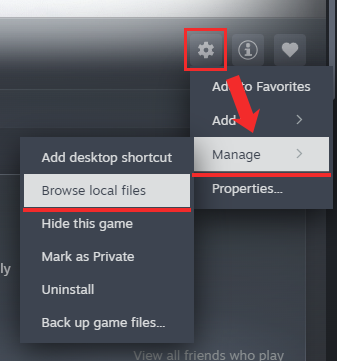
Folder by folder
/apps/
All user apps. Lua apps are lightweight and generally faster than Python ones.
/cache/
Temporary game data, kept to shorten load times and avoid recomputing things: AI lines, Lua scripts, car data, track data, tree data, remote assets and more.
/cfg/
Game settings stored as .ini files, initialised at launch. Most of them can be set from Content Manager instead.
/content/
All cars, tracks, fonts, driver models and similar assets — the bulk of the game’s content. Most mods go here, each in its own named subfolder so the game detects and loads it correctly.
/crash_logs/
Only used when launching through Steam. Content Manager has its own logging, writing to Documents/Assetto Corsa/logs in your user folder, so you can ignore this one.
/extension/
Everything CSP-related. Not a stock folder — if it exists, CSP has been installed. Contains the Lua SDK, backgrounds, chase cameras, config files, SFX, VAO patches, WFX and more.
/launcher/
Files for the original JavaScript launcher; AssettoCorsa.exe starts acs.exe from here.
/sdk/
Tools and resources for mod authors, such as ksEditor for building car and track mods.
/server/
Everything needed to run a multiplayer server: executables, config files, track and car data, logs. Used for self-hosting.
/system/
x86 / x64 libraries for VR and Python, plus other internal settings (under system/cfg, and defaults such as data/surface.ini).
Source: AssettoCN docs (community)
Edit this page on GitHub