Buy & install the game
Draft · under reviewWhat you need
- A Windows PC — Assetto Corsa is played mainly on Windows, and the mod ecosystem lives there too.
- A Steam account.
Steps
- Open Steam and search for Assetto Corsa. Note this is not Assetto Corsa Competizione — that’s a different game with a separate mod ecosystem.
- Buy and install the base game. Getting the DLC is strongly recommended — many mods and servers use official DLC cars and tracks.
- Once installed, launch it once with the stock launcher to confirm it runs.
Remember the game folder
You’ll need the install folder later for mods and CSP. It’s usually:
...\steamapps\common\assettocorsa
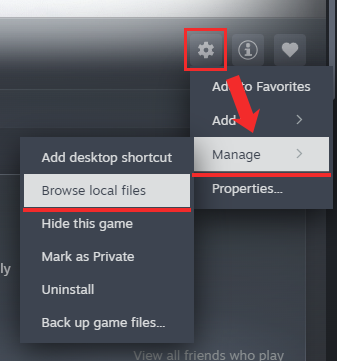
In your Steam library, right-click the game → Manage → Browse local files to open it.
Next
With the base game in place, don’t settle for the stock launcher — next, install Content Manager and CSP, the de-facto standard for modern AC.